
My First Experience with Claude + Fusion MCP
Updated: Jun 12

Artificial Intelligence is rapidly changing how we work, and CAD design is no exception.
Recently, I had the opportunity to experiment with Claude and Fusion MCP for the first time.
My goal was simple: understand how far AI-assisted CAD workflows have progressed and whether they can genuinely help designers and engineers accelerate the design process.
The result?

Surprisingly good.
From Idea to CAD Model Using Natural Language
Traditionally, creating a 3D model requires a designer or engineer to translate an idea into sketches, features, dimensions, and constraints before building the model step by step.
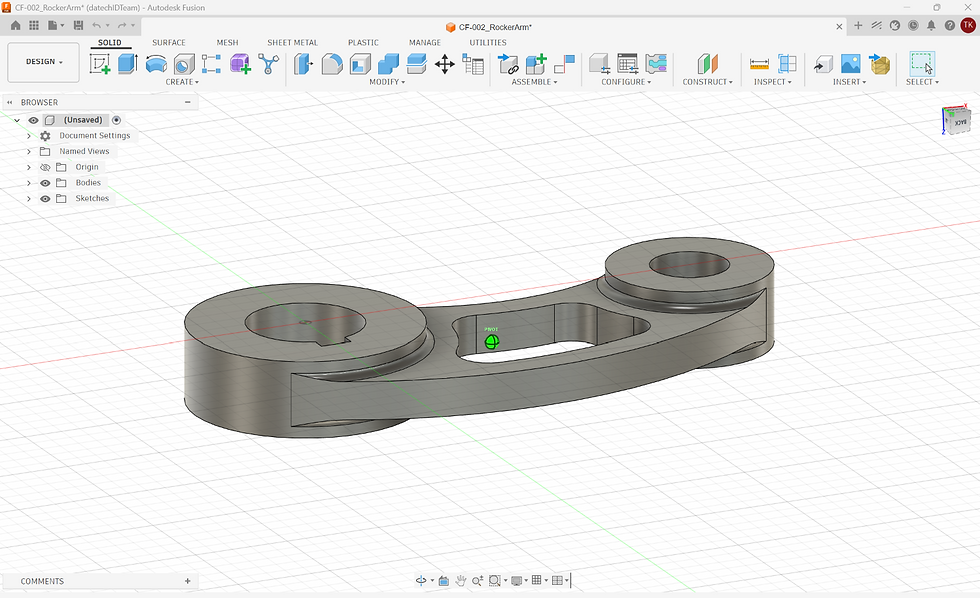
With Claude and Fusion MCP, the workflow begins differently:
Idea
↓
Text Prompt
↓
Claude
↓
Fusion MCP
↓
CAD Model
↓
Engineer Refine
Instead of starting with a blank CAD workspace, I started with a simple prompt describing what I wanted to create.
Claude interpreted the request and communicated with Fusion through MCP, generating the initial geometry automatically.
What impressed me most was not only the resulting model, but also the ability to observe how the model was created through individual design features and operations.
What AI Does Well
Based on my initial testing, AI can significantly accelerate the early stages of CAD modeling.
It can:
Generate basic geometry
Create common mechanical features
Build structured feature history
Help transform ideas into visual concepts quickly
Reduce the effort required to create a first draft model
For hobbyists, students, and even experienced CAD users, this can dramatically reduce the barrier between concept and prototype.
What AI Does NOT Replace
A common concern is whether AI will eventually replace engineers.
My answer is simple:
Not anytime soon.
While AI can generate geometry, engineering involves much more than creating a 3D model.
Engineers still make critical decisions regarding:
Manufacturability
Material selection
Safety requirements
Industry standards and compliance
Cost optimization
Performance and reliability
Design trade-offs
In other words:
AI generates geometry. Engineers create products.
The role of engineering expertise remains essential.
My Takeaway
The most exciting part of this experience is not automation itself.
It's accessibility.
People with ideas can now experiment with product concepts faster than ever before.
Meanwhile, experienced designers and engineers can spend less time creating initial geometry and more time solving real engineering problems.
We are still in the early stages of AI-assisted CAD, but the direction is becoming increasingly clear.
The future may not be AI replacing engineers.
The future may be engineers who know how to work effectively with AI.
Download and Try It Yourself
I've shared the files and resources I used during this experiment.
Download them here: https://drive.google.com/drive/folders/1V0N5wq6hwpdQaoBOFoISbYsuS2Neau9B?usp=drive_link
Drawing reference used for this exercise: Modeling Practice Drawing 152 by StudyCADCAM.
I'd be interested to hear about your own experience with Claude, MCP, and AI-assisted CAD workflows.

Comments