


_edited.png)

What's New in AutoCAD 2027


Forma Data Management Essentials

My Secret to Smarter Workdays

Geometry CleanUp with AI

Autodesk AI Assistant


What's new in AutoCAD 2027
With Autodesk AI-powered guidance, automated geometry cleanup, and cloud-connected workflows through
Forma Data Management, AutoCAD 2027 helps you coordinate changes more easily and keep projects moving forward.

Autodesk Assistant
The Autodesk Assistant delivers intelligent, in-context guidance powered by Autodesk AI. With the introduction of Model Context Protocol (MCP), it now interprets drawing context and user intent, enabling CAD standards checking and allowing you to leverage enhanced AI chat and prompt-driven workflows.

Geometry Cleanup
Geometry Cleanup identifies common geometry errors such as gaps, overshoots, undershoots, and misaligned angles and suggests targeted fixes. By streamlining error detection and correction in DWG files, it reduces manual cleanup, improves drawing quality and boosts drafting productivity.

3D visualization with GSF enhancements
Expanded Graphics System Framework (GSF) support improves performance and reliability across AutoCAD’s 3D workflows, delivering smoother navigation, broader 3D coverage, and support for Realistic visual styles, materials, and lighting.

AutoCAD on the web: Plot Improvements
Improved Forma Data Management integration, allowing you to save plots to the cloud, rename files, choose locations and preview PDFs.

Forma Data Management Essentials
Forma Data Management Essentials is now included with standalone subscriptions of AutoCAD, bringing cloud-based project data management directly into the tools you already use. Leverage advanced collaboration features like Checkout to support parallel work, improved coordination, and secure cloud-managed drawings.
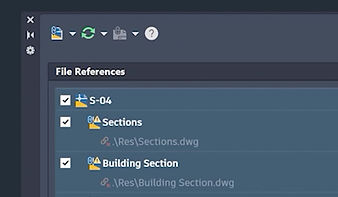
Connected References
Preserve Xref integrity for drawings stored in Forma Data Management by detecting moved or renamed references and suggesting automatic repairs.

AutoCAD on the web: Forma Data Management Issues
Create, view, and resolve Forma Data Management Issues directly in AutoCAD on the web to improve communication and keep teams aligned.

AutoCAD on the web: Integration with Forma Board
View and edit DWGs in Forma Board with AutoCAD on the web to connect detailed CAD drafting with collaborative early-design workflows.

Checkout
Checkout introduces a new way of collaborating on shared DWG files by reserving only the geometry you need, allowing you to work in parallel within isolated editing environments and safely apply changes back to the source drawing via Forma Data Management, keeping you in control.

Connected Support Files
Get centralized control over cloud-based support files. Project-aware tool palettes and CUI ensure the correct resources load automatically.

AutoCAD on the web: Sheet Set Manager improvements
Sheet Set Manager on the web now fully adopts Connected Support Files, with improvements to templates, workflows, and reliability.
AutoCAD user ratings and reviews

Autodesk AutoCAD: Faster, smarter 2D and 3D drafting


Unlock your creativity with powerful 2D and 3D CAD tools. With AI-powered insights and automation, AutoCAD helps professionals transform concepts into precise, high-quality designs.
-
Unlock insights and automations powered by Autodesk AI
-
Tailor for industries with specialized toolsets and apps
-
Manage design data with Autodesk Docs integrations.
5 reasons AutoCAD stands apart from CAD alternatives
.png)
AI insights and automations
AI-powered automation in AutoCAD speeds up everyday drafting tasks.

Access to support and community
Get support, learning resources, and help from the AutoCAD Community.

Best-in-class exchange with DWG
Trusted DWG ensures DWG accuracy and compatibility.
.png)
Productivity gains with included toolsets
Included toolsets deliver up to 63% productivity gains.
.png)
Connected design experience
Connected design and collaboration across web and mobile.

Meet Forma Data Management Essentials (FDME)


Forma Data Management Essentials provides cloud-based project data management directly connected to eligible Autodesk desktop design tools. Included with standalone subscriptions of AutoCAD, Revit, and Civil 3D, it gives teams a centralized, cloud-connected environment to organize, view, and share project information. Through built-in desktop integrations, teams can collaborate more easily and keep project data connected as work progresses.


Improve your AutoCAD skills (Advantage Program)
Why choose Autodesk AutoCAD

Industry Standards
Work with industry standard files for smooth collaboration and exchange.

Improved Visualization
Visualize designs in 3D to communicate ideas clearly and early.

Analysis and Simulation
Analyze and test designs early to improve performance and results.

Enhanced precision
Create accurate, detailed drawings with precise dimensions and consistency.

Productivity and Automation
Automate repetitive tasks to work faster and focus on complex design.

Anywhere, Anytime
Access and edit designs anywhere with cloud based workflows.

Increased Efficiency
Speed up drafting with templates, blocks, and easy design updates.

Extensive Resource Library
Access ready made blocks and templates to speed up drafting work.

Updates and Support
Stay up to date with new features and community driven support.

Seamless Collaboration
Work together in real time, improving teamwork and reducing errors.

Documentation&Annotation
Create clear dimensions and notes for accurate design communication.

Customisation Options
Customize tools and shortcuts to match your workflow and work faster.

Versatility
Create 2D and 3D designs across industries with one powerful tool.

Software Integration
Connect AutoCAD with other tools for smooth and connected workflows.

Data Extraction and Report
Extract design data easily for reports and project analysis.
AutoCAD designed for industry (Toolsets)
Power your designs, workflow, and productivity with purpose-built AutoCAD toolsets for the tasks you perform the most. All seven are included with every AutoCAD subscription.

Architecture Toolset
Boost architectural design and drafting productivity by up to up to 61% with time-saving features and task automation.

Electrical toolset
Boost productivity by up to 95% with electrical design features that help you create, modify, and document electrical controls systems.

Mechanical toolset
Increase productivity by up to 55% with industry-specific tools for mechanical engineering, including 700,000+ intelligent parts and features.

Plant 3D toolset
Create and edit piping and instrumentation diagrams (P&IDs) and 3D models, and extract piping orthographies and isometrics with an industry-specific toolset for plant design.

Map 3D toolset
model-based geographic information system (GIS) mapping software provides access to CAD and GIS data to support planning, design, and management.

Raster Design toolset
Use raster design tools in a specialized toolset to edit scanned drawings and convert raster images to DWG objects.

MEP toolset
HVAC and building systems are made easy with an industry-specific toolset for MEP that increases productivity by up to 85%.
Customer Stories

Image courtesy of APUDG Sdn Bhd. Bandar universiti Pagoh (BUP) Project in Malaysia
“"AutoCAD directly contributes to our ability to deliver projects on time and to the precision standards our clients expect. It reduces rework, speeds up our production pipeline, and gives us confidence in drawing accuracy."”
— Helmi Mohamad, Head of MPD, APUDG Sdn Bhd



.png)
.png)
.png)
.png)
.png)
.png)
.png)
.png)
.png)
.png)
.png)
.png)

