
Inventor 2027: AI, Visual Automation, and Smarter Design Tools
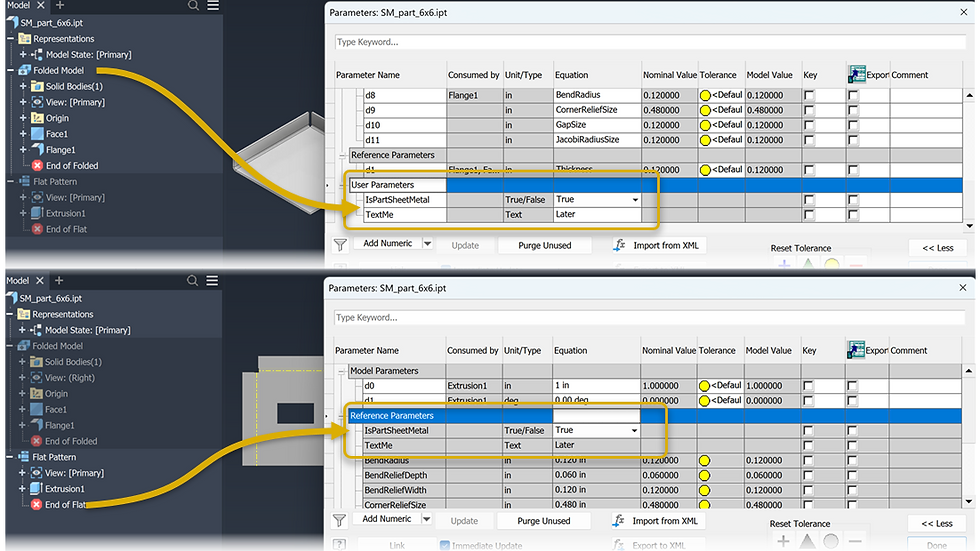
Sheet Metal workflows in release of Inventor 2027

Autodesk released Inventor 2027 on March 25, 2026, and this release is all about helping engineers design faster, work smarter, and automate more — without writing a single line of code. From a built-in AI assistant that can analyze and modify your models in plain language, to a visual drag-and-drop automation tool that makes iLogic accessible to everyone, Inventor 2027 delivers a focused set of upgrades that will immediately change how you work every day.
Here's What you need to know
1.Autodesk Assistant — AI That Works Inside Your Inventor Model
The biggest addition in Inventor 2027 is the Autodesk Assistant — an AI-powered experience built directly into the software and available as a Tech Preview. With a natural-language interface, you can simply ask questions, give instructions, and receive meaningful results without opening multiple files or writing code. The Assistant features 37 different tools and can analyze models, create model states, suppress components, generate parameters, automate repetitive tasks, and provide access to official Autodesk help documentation and tutorials — all from a single conversation panel. Whether you're defining parametric designs, checking manufacturability, or exporting data, the Assistant surfaces insights instantly and keeps you focused on engineering rather than navigation.
2.Codeblocks for iLogic — Visual Automation Without Scripting
Inventor 2027 makes automation accessible to everyone with the introduction of Codeblocks for iLogic. Long considered a powerful but complex feature, iLogic can now be built visually — by connecting puzzle-like blocks that represent parameters, conditions, and actions in a drag-and-drop interface. There's no scripting required to get started. Users can build automation workflows step by step, guided by a system that shows how everything connects. For those ready to go further, Codeblocks also displays the underlying iLogic code in real time, allowing users to learn, refine, and extend their rules as their skills grow. This bridges the gap between first-time automation users and advanced iLogic power users — making smarter, more standardized models available to the entire team.
3.New Slot Feature — Speed, Precision, and Real-World Manufacturing
One of the most common and time-consuming design tasks just got a dedicated tool. Inventor 2027 introduces a brand new Slot feature with an intuitive in-canvas experience and a modern property panel. You can quickly define slot size, orientation, and placement with full control — supporting standard, countersunk, and counterbore options. The feature delivers the same familiar power as the Hole command while expanding design capability for real-world manufacturing needs. Drive slot size through dimensions, centerline definitions, or fastener-based clearance, and use reusable presets for common configurations to speed up repetitive work across projects.
4.Assembly Mirror — More Flexibility and Control
Inventor 2027 enhances the Assembly Mirror workflow with greater flexibility and control over how mirrored components behave. Users can now choose exactly how mirrored components relate to their source — maintain associativity, break the link, create a new file with Save Copy As, or mirror the component's feature tree. Specific components can be excluded from the operation. The new Associative Placement capability allows mirrored components to be repositioned while preserving their relationship to the source design. Together these improvements make it easier to create and manage mirrored assemblies, giving teams the freedom to adapt designs quickly while maintaining accuracy and efficiency.
5.Content Center Now Supports Full Assemblies
Inventor 2027 expands the power of Content Center by enabling teams to publish and reuse complete assemblies — not just individual parts. Commonly used multi-component models like cylinders, motors, and purchased assemblies can now be stored, managed, and inserted just as easily as standard components. Placement options remain familiar, allowing assemblies to be placed as standard or custom items. This gives Content Center a new level of relevance for teams managing repeatable design starting points, core product configurations, or frequently reused purchased assemblies — bringing a new standard of efficiency and standardization to engineering workflows.
Inventor 2027 is a focused, well-rounded release that raises the bar on automation, AI assistance, and everyday modeling efficiency. The Autodesk Assistant alone changes how engineers interact with their models. Codeblocks makes iLogic automation accessible to teams that previously found scripting a barrier. The Slot feature, Assembly Mirror upgrades, and Content Center assembly support round out a release that delivers immediate value across every discipline using Inventor.
Learn More Autodesk Revit 2027
Get Inventor 2027: https://www.autodesk.com/products/inventor/overview
Inventor features page: https://www.autodesk.com/products/inventor/product-details
Autodesk Access (download/upgrade): https://www.autodesk.com/support/download-install/individuals-and-teams/autodesk-access
What's New webinar — April 21 & 22, 2026: https://www.autodesk.com/webinars/dm/inventor-2027-whats-new
Full release notes: https://help.autodesk.com/view/INVNTOR/2027/ENU/?guid=Inventor_ReleaseNotes_release_notes_html
Autodesk Community — release thread: https://forums.autodesk.com/t5/inventor-forum/inventor-professional-2027-is-now-released/td-p/14066310


Comments